
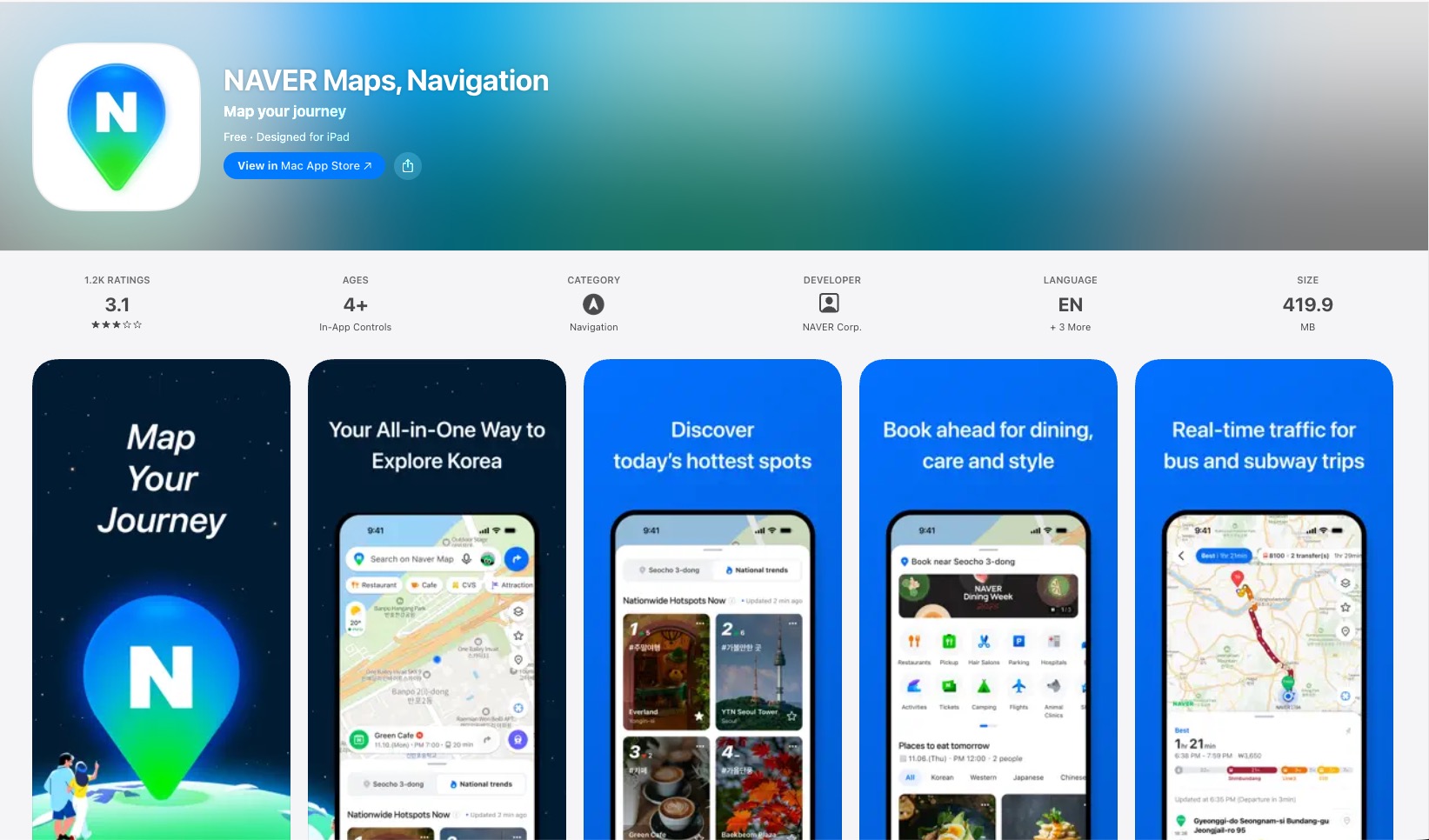
The most common mistake foreigners make with korea travel apps is assuming the ones that work everywhere else will work here too. They don’t. Korea runs on a parallel app ecosystem — Naver and Kakao instead of Google — and if you land in Seoul without the right setup, you’ll discover this the hard way at a bus stop in the rain.
I’ve been living in New Zealand for over 11 years and visiting Korea regularly. Each trip means re-syncing with an app environment that’s genuinely different from what works in the rest of the world. Not worse — different. Once you know the five apps that actually matter, getting around Korea becomes straightforward. Without them, basic tasks like hailing a taxi or reading a menu become genuinely difficult.
This guide covers what you need, why you need it, and how to set it up before you land.
Quick Answer: Korea Travel Apps for Foreigners
The five-app minimum that covers everything:
- Naver Map — navigation (replaces Google Maps)
- Kakao T — taxis (Korea’s standard ride-hailing app)
- Naver Papago — translation (better than Google Translate for Korean)
- KakaoTalk — messaging (Korea’s default communication platform)
- WOWPASS or T-money — payment and transit card
Install all five before you fly. Each takes under two minutes to set up and none requires a Korean phone number to use.
The Google Maps Problem in Korea
Google Maps works fine for finding a location in Korea — addresses, landmarks, restaurants. What it doesn’t do well is directions. Turn-by-turn walking routes are inconsistent, public transit routing is incomplete, and real-time bus tracking is essentially non-functional in most areas.
This isn’t a Google Maps quality issue. It’s a data access issue. Korean mapping data is subject to national security regulations that restrict how it can be shared with foreign servers. Google hasn’t been able to fully license the same data that Naver and Kakao use. The result: Google Maps shows you where things are, but not reliably how to get there.
For a country with one of the world’s best public transit systems — where most visitors will be using buses, subway, and walking routes daily — this matters.
The fix is simple. Two apps handle it completely.
Navigation: Naver Map (Primary) and KakaoMap (Backup)
Naver Map is the go-to for foreigners. The interface is available in English, and it covers bus routes, subway lines, walking directions, estimated transit times, and real-time bus tracking — all reliably. It also shows restaurant and attraction information with reviews, hours, and photos. Google Play · App Store
For a first-time visitor who needs a single navigation app, Naver Map is the one to install.
KakaoMap does the same job with a simpler interface. If Naver Map ever gives you a confusing result, KakaoMap is worth a second opinion. It’s faster for locals because the UI is minimal — less information density, quicker to load. The English support is more limited than Naver Map, but the core directions function works fine. Google Play · App Store

How to use Naver Map as a foreigner:
- Search in English or Korean — both work
- Tap “Transit” or “Walk” at the top to switch routing mode
- The “Live” indicator on bus stops shows real-time arrivals — this is the feature Google Maps can’t replicate in Korea
💡 Insider tip: Save your hotel and key locations as bookmarks in Naver Map before you leave the airport. The app works on data, but having saved pins means you can navigate even on patchy signal.
Taxis: Kakao T (and What to Do Without a Korean Number)

Kakao T is Korea’s standard taxi app — the equivalent of Uber in most countries. You enter your destination, see the estimated fare upfront, and pay by card in-app. The driver tracks your pickup location and you track the car in real time. It works exactly as you’d expect. Google Play · App Store
The complication for foreigners: the standard Kakao T registration asks for a Korean mobile number for verification.
Two solutions:
Option 1 — Kakao T with a foreign number: Kakao T has expanded foreign number support. Try registering with your New Zealand or Australian number using the international prefix. This works for many countries as of 2026 — check the app’s current registration flow when you download it.
Option 2 — TABA or k.ride: Both are taxi apps built specifically for foreigners without Korean numbers. They integrate with Kakao T’s network (meaning you get the same pool of drivers) but use international number verification. TABA has a clean English interface and is the most straightforward option if Kakao T registration fails.
⚠️ Street taxis: You can still hail taxis from the street in Korea without any app — just make sure you’re at a taxi stand or a spot where they stop, and have your destination written in Korean to show the driver (Google Translate screenshot works). Apps are more convenient for longer trips or unfamiliar areas, but street hailing works fine in Seoul city centre.
Translation: Naver Papago

Google Translate handles Korean adequately for short phrases. Papago handles it better. Google Play · App Store
Papago is Naver’s translation service, trained specifically on Korean-English (and Korean-Japanese, Korean-Chinese) pairs. The practical difference shows up on menus, signage, and conversation translation — contexts where Korean idioms and regional terms trip up general-purpose translation models.
The three features worth using:
Camera translation: Point your phone at a menu, sign, or product label and the app overlays a live translation. This is the feature you’ll use most — restaurant menus in Korea are often Korean-only, even in Seoul tourist areas.
Voice translation: Speak in English, get Korean output with audio. Useful for directing taxi drivers, asking for help in shops, or ordering at counters where typing feels slow.
Conversation mode: The app splits the screen for two-person back-and-forth translation. Useful at hotels, clinics, or anywhere you’re having a proper exchange.
💡 Google Translate has improved significantly and is worth having as a backup. But if you only install one translation app for Korea, make it Papago.
Transit: KakaoMetro and Subway Korea
Naver Map handles most transit navigation. For detailed subway use — particularly for working out which exit to take at large stations — two dedicated apps are worth knowing.
KakaoMetro shows live departure times, platform information, and a full network map. The key feature: it tells you exactly which carriage to board for the optimal transfer or exit at your destination. Seoul’s larger stations (Seoul Station, Express Bus Terminal, Gangnam) have complex underground layouts where the right exit can save you ten minutes of walking. Google Play · App Store
Subway Korea covers multiple Korean cities and includes offline functionality — useful if you’re in an area with poor signal underground. The interface is more functional than beautiful, but it’s reliable. Google Play · App Store
For most visitors staying in Seoul, KakaoMetro is sufficient. Add Subway Korea if you’re travelling to Busan, Daegu, or other major cities.
Communication: KakaoTalk

Korea runs on KakaoTalk. Not WhatsApp, not iMessage — KakaoTalk. If you’re meeting local contacts, booking through small guesthouses, or coordinating with family, this is where those conversations happen. Google Play · App Store
For tourists with no Korean contacts, KakaoTalk is less immediately essential. But you’ll hit two situations where it matters:
Accommodation communication: Many guesthouses and smaller hotels use KakaoTalk as their primary contact channel. If your booking confirmation says “contact us on KakaoTalk,” you need the app.
Local contacts: If you’re visiting family or meeting Korean colleagues (the reason Tim’s coworkers are heading over), they will assume you have KakaoTalk. Setting it up takes two minutes with your existing phone number and profile photo.
The app is free, available globally, and works with any phone number — no Korean number required.
Payment and Transit Card: WOWPASS and T-money

Korea is heavily card-friendly, and most international Visa/Mastercard debit cards work at ATMs, convenience stores, restaurants, and hotels. The friction point is transit and small vendors.
Seoul’s subway and bus system uses a tap card (T-money system). Without a T-money card or compatible app, you can’t use public transit — you can’t buy a single-ride token from the machine and tap into the bus the same way.
Two solutions:
T-money card (physical): Available at every convenience store (GS25, CU, 7-Eleven) for around ₩3,000–4,000. Top it up at the convenience store counter with cash or card. Works on all Seoul buses, subway, and most convenience store purchases. Simple, reliable, no setup required.
WOWPASS: A prepaid card designed specifically for foreigners. You load it with money via the WOWPASS app (accepts international cards and currency exchange), and it works as both a T-money transit card and a general payment card at most merchants. Google Play · App Store · Official site The advantage over a basic T-money card: you can load it with foreign currency at competitive exchange rates, track your balance and spending in the app, and use it at ATMs. If you’re managing a travel budget and want a single card that handles transit and day-to-day spending, WOWPASS is worth the slightly higher setup cost.
💡 Get a physical T-money card immediately at the airport convenience store on arrival — it covers your first transit needs while you set up anything else. The WOWPASS is better for a longer trip.
Bonus: Food Delivery in Korea for Foreigners
Korea’s delivery culture is genuinely impressive — fast, cheap, and available almost everywhere. If you’re staying in a serviced apartment or just want food after a long day, it’s worth knowing which app to use. The short answer: start with Coupang Eats, keep Shuttle as a backup, skip Baemin entirely.
| Coupang Eats | Shuttle | Baemin | |
|---|---|---|---|
| Best for | Everyone — default choice | When your card keeps failing | Only with a Korean local |
| Language | English UI + auto-translated menus | Full English (native level) | Korean only |
| Foreign cards | Works (occasional errors) | International cards + PayPal | Very difficult |
| Speed | Very fast (single-restaurant delivery) | Slower, fewer restaurants | Fast — but irrelevant if you can’t get in |
| Downside | Menu translations can be awkward | Higher delivery fees, smaller selection | Requires Korean phone verification |
Coupang Eats is the closest experience to Uber Eats or DoorDash — large restaurant selection, English interface, and a single-restaurant delivery model that means your food arrives faster than most other apps. Try this first. Google Play · App Store
Shuttle is the fallback when your international card is getting declined. It’s built specifically for expats and foreigners — PayPal and international card support work reliably, and the English customer service is genuinely helpful. The trade-off is a smaller restaurant selection and slightly higher delivery fees. Google Play · App Store
Baemin has the largest restaurant selection in Korea and is what most locals use — but it requires Korean phone verification and has a Korean-only interface. Unless you’re ordering with a Korean contact who can navigate it for you, skip it.
💡 One practical tip: Many Korean apartment buildings and hotels have a designated delivery drop-off spot — a lobby table or a rack near the entrance. Check with your accommodation when you arrive so your order doesn’t get left somewhere you can’t find it.
The 5-App Korea Setup — Install Before You Fly
| App | Purpose | Korean number needed? | Download |
|---|---|---|---|
| Naver Map | Navigation, transit, restaurant info | No | Play · iOS |
| Kakao T | Taxis | Try without — use TABA as backup | Play · iOS |
| Naver Papago | Translation (camera, voice, text) | No | Play · iOS |
| KakaoTalk | Messaging | No (any number works) | Play · iOS |
| WOWPASS | Payment + transit card | No | Play · iOS |
Pre-flight checklist:
- Download all five apps
- Register Kakao T — confirm whether your country’s number works
- Download WOWPASS and verify your account (takes 1–2 days for identity verification)
- Save your hotel address in Naver Map
- Have your destination in Korean text ready for taxis (screenshot or saved note)
At the airport on arrival:
- Pick up a physical T-money card at the convenience store (GS25 or CU, arrivals level)
- Top up ₩10,000–20,000 on the T-money card immediately — covers your first few transit rides
- Confirm Naver Map is routing correctly before you leave the terminal
FAQ
Does Google Maps work in Korea?
Google Maps works partially in Korea. It shows locations, addresses, and restaurant details accurately. It does not provide reliable public transit routing or real-time bus tracking — the core navigation features most travellers need. Use Naver Map for all directions in Korea, and keep Google Maps only for finding locations.
Do I need a Korean phone number to use apps in Korea?
No, you do not need a Korean phone number to use the essential apps in Korea. Naver Map, Papago, and KakaoTalk all work with an international phone number. Kakao T has expanded international number support — check registration when you download it. If it fails, TABA works as a taxi alternative without a Korean number.
What’s the best way to pay in Korea as a foreigner?
The best payment setup for foreigners in Korea is a WOWPASS card for transit and day-to-day spending, plus your international Visa or Mastercard for larger purchases. Most restaurants, hotels, and shops accept international cards directly. The T-money transit system requires a local card — WOWPASS functions as one, or buy a physical T-money card at a convenience store for around ₩3,000–4,000.
Is Naver Papago better than Google Translate for Korean?
Yes, Naver Papago is better than Google Translate specifically for Korean. Papago is trained on Korean-English pairs with more nuance for Korean idioms, menu language, and conversational context. Google Translate has improved and is worth having as a backup, but Papago produces more accurate results for the situations you’ll encounter most — menus, signage, and conversation translation.
Can I use Kakao T without a Korean SIM card?
Kakao T now supports some international phone numbers for registration — check the app’s current registration flow when you download it, as this has expanded in 2024–2025. If your number isn’t accepted, use TABA or k.ride instead, both of which are designed for foreigners and connect to the same taxi network as Kakao T.
What app do Koreans actually use for maps?
Koreans use either Naver Map or KakaoMap — both are far more widely used than Google Maps for domestic navigation. Naver Map is preferred for its detailed information and English support, making it the better choice for foreign visitors. KakaoMap is popular locally for its speed and simplicity.
Related Guides
- Korean Food Bucket List: What This NZ Expat Eats Every Visit — what to eat once you’re there
- Essential Bali App Guide: WhatsApp, Grab, GoJek — same approach for another destination with a local app ecosystem
- Wise Card vs Traditional Cards: Which One Is Better for Travel — for managing currency and payments across the trip
The short version: Korea runs on Naver and Kakao, not Google and Uber. The five apps above cover every situation a foreign visitor will encounter — navigation, taxis, translation, communication, and transit. All five are free, none require a Korean number to set up, and all can be installed and ready before you land.
Do this before you board. You’ll spend the first hour in Korea actually seeing Korea, not troubleshooting your phone at the airport.